

 +91 9745927777
What Is RAG? A Complete Beginner's Guide
- 03 / Jul / 2026
- By: Saniyo Mathew
- Comments: 0
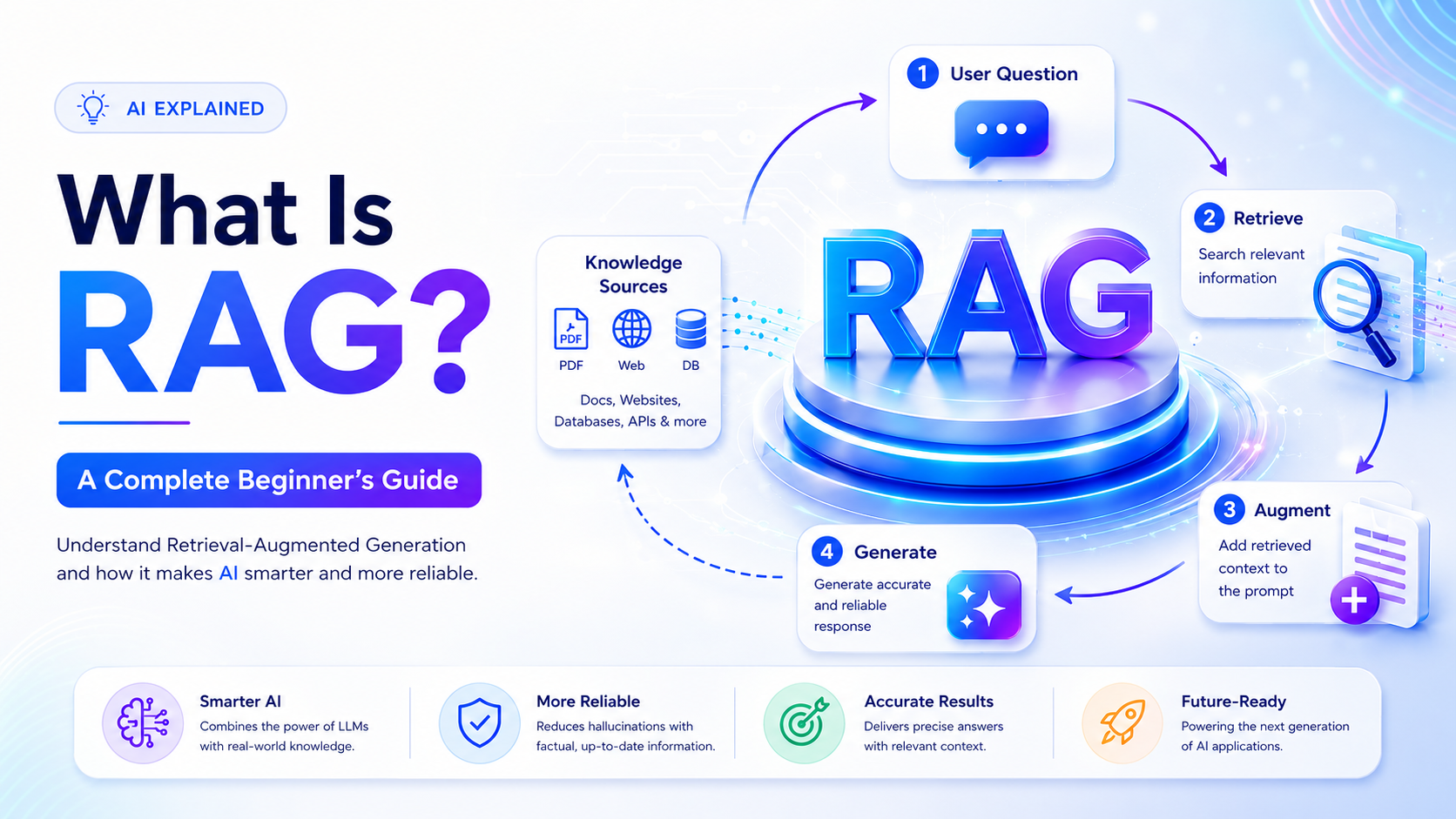
- Category: Artificial Intelligence
If you've spent any time around large language models (LLMs) like GPT or Claude, you've probably run into a frustrating limitation: these models only know what they were trained on. Ask them about your company's internal policy document, last week's news, or a product that launched after their training cutoff, and they'll either say they don't know — or worse, confidently make something up.
This is exactly the problem Retrieval-Augmented Generation, or RAG, was built to solve. If you've been searching for what RAG is, how it works, and why it's become one of the most widely deployed patterns in applied AI, this guide covers everything a beginner needs, from the core concepts to the enterprise use cases driving adoption in 2026.
What Is RAG, in Plain English?
RAG stands for Retrieval-Augmented Generation. It's a technique that connects a large language model to an external knowledge source — a document library, a database, a set of PDFs, a website — so that the model can "look things up" before answering, instead of relying purely on what it memorized during training.
Think of it like the difference between a closed-book exam and an open-book exam. A standard LLM answering a question is working from memory alone — it's a closed-book exam, and if the answer isn't something it learned during training, it either gets it wrong or hallucinates a plausible-sounding but incorrect answer. RAG turns that into an open-book exam: before the model answers, it retrieves the most relevant passages from a trusted source and uses them as reference material to ground its response.
The name breaks down into its two core steps:
-
Retrieval — Finding the most relevant pieces of information from an external knowledge base in response to a query
-
Augmented Generation — Feeding that retrieved information into the LLM alongside the original question, so the model generates its answer using both its general language understanding and the specific, up-to-date facts it was just given
The result is an AI system that can answer questions accurately about information it was never trained on — your company's latest product specs, a legal contract uploaded five minutes ago, or a research paper published last week — without needing to retrain or fine-tune the underlying model.
Why RAG Exists: The Problem It Solves
To understand why RAG matters, it helps to understand the specific limitations of LLMs that it addresses.
1. Knowledge Cutoffs
Every LLM is trained on a snapshot of data up to a certain date. Anything that happened after that — a new product launch, a policy change, a recent event — simply isn't in the model's "memory." RAG solves this by retrieving current information at the moment of the query, rather than relying on what was baked in during training.
2. Hallucinations
When an LLM doesn't know something, it doesn't reliably say "I don't know." Instead, it often generates a fluent, confident-sounding answer that is factually wrong — a phenomenon known as hallucination. This happens because the model is fundamentally a next-word predictor; it's optimized to produce plausible text, not necessarily true text. By grounding the model's response in retrieved, verifiable source material, RAG significantly reduces (though doesn't fully eliminate) the risk of hallucination.
3. Private and Proprietary Data
LLMs are trained on public data. They have no knowledge of your company's internal wiki, your customer database, your legal contracts, or your product documentation - and for good reason, since that data shouldn't be part of a public training set in the first place. RAG lets organizations connect an LLM to their own private data at query time, without ever exposing that data during model training.
4. The Cost and Complexity of Fine-Tuning
One alternative to RAG is fine-tuning — retraining a model on your specific data so it "absorbs" that knowledge. But fine-tuning is expensive, time-consuming, and needs to be repeated every time your data changes. If your product catalog updates weekly, fine-tuning a model every week isn't practical. RAG solves this by keeping the knowledge base separate from the model — update the documents, and the system immediately has access to the latest information, no retraining required.
How RAG Works: A Step-by-Step Breakdown
At a high level, a RAG system involves two phases: an indexing phase (done ahead of time, to prepare your knowledge base) and a query phase (done in real time, every time a user asks a question). Let's walk through both.
Phase 1: Indexing (Preparing the Knowledge Base)
Before a RAG system can answer any questions, it needs to process and organize the source documents it will retrieve from. This happens once, and again whenever the underlying documents change.
Step 1: Document Collection Gather the source material — PDFs, Word documents, web pages, database records, support tickets, wikis, transcripts, whatever the knowledge base needs to cover.
Step 2: Chunking Documents are broken into smaller pieces called "chunks." This step is more important than it sounds, and we'll cover it in detail below.
Step 3: Embedding Each chunk is converted into a numerical representation called an embedding, using an embedding model. This turns text into a format that can be mathematically compared for similarity.
Step 4: Storage in a Vector Database The embeddings, along with references back to their original text, are stored in a specialized database called a vector database, built for fast similarity search across millions of embeddings.
Phase 2: Query (Answering a User's Question)
This happens every time a user interacts with the system.
Step 1: Query Embedding The user's question is converted into an embedding using the same embedding model used during indexing, so it exists in the same "space" as the document chunks.
Step 2: Retrieval The system searches the vector database for the chunks whose embeddings are most similar to the query's embedding — in other words, the passages that are most semantically relevant to what the user is asking.
Step 3: Augmentation The retrieved chunks are inserted into the prompt sent to the LLM, typically with an instruction like: "Using only the following context, answer the user's question."
Step 4: Generation The LLM generates its answer, grounded in the retrieved context rather than relying solely on its internal training knowledge.
Step 5: (Optional) Citation Many production RAG systems also return the source documents or passages used to generate the answer, so users can verify the response — a critical feature for enterprise and compliance-sensitive use cases.
Understanding Embeddings
Embeddings are the mathematical backbone that makes RAG possible, so it's worth spending real time understanding them.
An embedding is a way of representing a piece of text — a word, a sentence, a paragraph — as a list of numbers (a vector), typically with hundreds or thousands of dimensions. These numbers aren't arbitrary; they're generated by a neural network trained specifically to capture meaning. Text with similar meaning ends up with embeddings that are mathematically close to each other, even if the actual words used are completely different.
For example, the sentences "The car wouldn't start this morning" and "My vehicle failed to turn on today" use almost entirely different words, but an embedding model would place them very close together in vector space, because they mean nearly the same thing. This is what makes embeddings so powerful for retrieval: rather than searching for exact keyword matches (like a traditional search engine might), embedding-based search finds content that is semantically related to the query, even when the phrasing is completely different.
How Similarity Is Measured
Once text is converted into embeddings, the system needs a way to measure how "close" two embeddings are. The most common method is cosine similarity, which measures the angle between two vectors rather than their raw distance — two vectors pointing in a similar direction are considered similar, regardless of magnitude. Other methods, like Euclidean distance or dot product similarity, are also used depending on the embedding model and vector database.
Popular Embedding Models
There's a wide range of embedding models available, each with different trade-offs in accuracy, speed, cost, and dimensionality:
-
General-purpose commercial embedding APIs (offered by major AI providers)
-
Open-source embedding models that can be run locally or self-hosted for privacy and cost control
-
Domain-specific embedding models, fine-tuned for areas like legal, medical, or code-related text, which often outperform general-purpose models within their specialty
Choosing the right embedding model is one of the most consequential decisions in building a RAG system, because retrieval quality — and therefore answer quality — depends entirely on how well the embeddings capture the meaning of your specific content.
Understanding Chunking
Chunking is the process of breaking large documents into smaller pieces before they're embedded and stored. It sounds like a minor implementation detail, but in practice, chunking strategy has an outsized impact on how well a RAG system performs — poorly chunked data is one of the most common reasons RAG systems give bad answers.
Why Chunking Matters
You can't embed and retrieve an entire 200-page document as a single unit — it would be too large, too unfocused, and would produce an embedding that's a blurry average of everything in the document rather than a precise representation of any one idea. On the other hand, chunks that are too small might lose important context (a single sentence pulled out of a paragraph may be meaningless on its own).
The goal of chunking is to find pieces of text that are:
-
Small enough to represent a single, coherent idea
-
Large enough to retain the context needed to understand that idea
-
Structured in a way that preserves logical boundaries (like paragraphs, sections, or list items) rather than cutting off mid-sentence
Common Chunking Strategies
Fixed-size chunking — Splitting text into chunks of a set number of characters or tokens, often with some overlap between consecutive chunks to avoid losing context at the boundaries. Simple to implement, but can awkwardly cut across sentences or ideas.
Sentence-based chunking — Splitting text at sentence boundaries and grouping a set number of sentences together. This tends to produce more coherent chunks than pure fixed-size splitting.
Recursive chunking — A hierarchical approach that tries to split first by larger structural units (like paragraphs), and only falls back to smaller units (like sentences) if a chunk is still too large. This tends to produce more natural, context-preserving chunks.
Semantic chunking — Uses embeddings themselves to detect where the meaning of the text shifts, and splits at those natural topic boundaries rather than at arbitrary character counts. More computationally expensive, but often produces the highest-quality chunks.
Document-structure-aware chunking — Uses the actual structure of the source document (headings, sections, tables, bullet points) to guide chunk boundaries, which is especially useful for structured content like technical documentation, contracts, or reports.
Chunk Overlap
Most RAG systems use some degree of overlap between consecutive chunks — for example, ending one chunk with the last 50–100 tokens repeated at the start of the next. This helps ensure that information sitting near a chunk boundary isn't lost or fragmented in a way that makes it hard to retrieve.
Getting Chunking Wrong
If chunks are too large, retrieval becomes imprecise — the system pulls back a lot of irrelevant text along with the relevant part, diluting the quality of the context sent to the LLM. If chunks are too small, important context gets lost, and the retrieved information may be technically related but insufficiently complete for the LLM to generate an accurate, useful answer. There's no universal "correct" chunk size — it depends heavily on the type of content, the nature of typical user queries, and testing against real examples.
Vector Databases: Where the Magic Happens
Once your content is chunked and embedded, you need somewhere to store and search those embeddings efficiently — that's the job of a vector database.
Why Not Just Use a Regular Database?
Traditional databases are built to search for exact matches or ranges — find the row where customer_id = 12345, or all orders placed after a certain date. Vector databases are built for a fundamentally different task: given a query vector, find the nearest vectors in a space that might have millions or billions of dimensions worth of data points, and do it fast enough to feel instantaneous to a user.
This requires specialized indexing algorithms — most commonly variants of Approximate Nearest Neighbor (ANN) search, such as HNSW (Hierarchical Navigable Small World graphs), which trade a small amount of accuracy for dramatic gains in search speed. Searching for the mathematically exact nearest neighbor across millions of high-dimensional vectors would be too slow for real-time applications; ANN algorithms get remarkably close to the exact answer while being orders of magnitude faster.
Popular Vector Databases
The vector database ecosystem has matured significantly, with several categories of tools now widely used in production:
-
Purpose-built vector databases — Dedicated systems designed from the ground up for vector search, offering strong performance and features like metadata filtering, hybrid search, and multi-tenancy.
-
Vector search extensions for existing databases — Some traditional relational and NoSQL databases now offer vector search as an added capability, which can be convenient for teams that want to avoid managing a separate database system.
-
In-memory / lightweight vector libraries — Useful for smaller-scale projects, prototypes, or applications where the entire index can comfortably fit in memory.
The right choice depends on scale (thousands of documents vs. hundreds of millions), latency requirements, need for metadata filtering (e.g., "only search documents tagged as 'HR policy' and updated after 2025"), and whether you want a fully managed cloud service or a self-hosted solution for data privacy reasons.
Metadata Filtering
Beyond pure similarity search, most production vector databases support metadata filtering — attaching structured tags to each chunk (department, document type, date, access permissions) and allowing queries to combine semantic search with these filters. This is essential for enterprise use cases, where you often need to retrieve information that's not just semantically relevant, but also scoped to what a specific user is allowed to see, or restricted to a particular document category or time range.
Hybrid Search
Pure semantic (embedding-based) search is powerful, but it isn't always the best tool on its own. Sometimes exact keyword matching matters — for example, if a user searches for a specific product code or legal clause number, an embedding model might not weight that exact string highly enough. Hybrid search combines semantic vector search with traditional keyword search (often using an algorithm like BM25), then merges and re-ranks the results. Many modern RAG systems default to hybrid search because it captures the strengths of both approaches.
Beyond Basic RAG: Key Techniques That Improve Quality
A naive RAG implementation — embed, store, retrieve top-k chunks, generate — works, but production systems typically layer on additional techniques to improve accuracy and reliability.
Re-ranking — After an initial retrieval step pulls back, say, the top 20 candidate chunks, a separate, more computationally expensive re-ranking model re-scores those candidates for relevance and selects the best few to actually send to the LLM. This two-stage approach balances speed (a fast initial retrieval) with accuracy (a more careful final selection).
Query transformation — Sometimes the user's original question isn't phrased in a way that retrieves well. Techniques like query rewriting, query expansion, or breaking a complex question into multiple sub-questions can significantly improve retrieval quality before the search even happens.
Multi-hop retrieval — For questions that require combining information from multiple sources ("Compare our Q3 and Q4 revenue and explain the difference"), some systems perform multiple rounds of retrieval, using the results of an earlier retrieval step to inform a follow-up search.
Contextual compression — Rather than sending entire retrieved chunks to the LLM, some systems first compress or summarize the retrieved content to include only the most relevant sentences, reducing noise and token cost.
Self-checking / grounding verification — Some advanced RAG pipelines include a verification step where the system checks whether the generated answer is actually supported by the retrieved context, flagging or regenerating answers that appear to drift from the source material.
RAG vs. Fine-Tuning vs. Prompting: When to Use Each
A common point of confusion for beginners is understanding when RAG is the right tool, versus fine-tuning a model or simply writing a better prompt.
Prompting alone works well when the model already has the general knowledge it needs, and the task is mostly about instructing it how to behave, format its output, or reason through a problem — no external, private, or frequently changing information is required.
RAG is the right choice when you need the model to answer questions using specific, current, or private information that wasn't part of its training data, and that information changes often enough that retraining the model every time wouldn't be practical.
Fine-tuning is better suited to teaching a model a new skill, style, or behavior pattern — for example, adjusting how it writes in a particular tone, or teaching it to follow a very specific output format consistently — rather than teaching it new facts. Fine-tuning is comparatively expensive, doesn't update easily as facts change, and can actually make hallucination worse if used incorrectly to "teach" facts rather than behavior.
In many real-world systems, these approaches aren't mutually exclusive — a well-designed application might use a fine-tuned model that's also connected to a RAG pipeline, combining a customized behavior style with access to current, grounded information.
Enterprise Use Cases for RAG
RAG has moved well beyond research demos and into everyday enterprise deployment. Here are some of the most common and impactful applications.
1. Internal Knowledge Assistants
Perhaps the single most widespread enterprise RAG use case: connecting an LLM to a company's internal wikis, policy documents, onboarding materials, and past project documentation so employees can ask natural-language questions ("What's our current expense reimbursement policy?") instead of digging through a poorly organized intranet.
2. Customer Support Automation
Companies connect RAG systems to their product documentation, past support tickets, and FAQ libraries to power chatbots and support agents that can answer customer questions accurately, cite the specific documentation used, and escalate to a human when the retrieved information doesn't sufficiently answer the query.
3. Legal and Contract Analysis
Law firms and legal departments use RAG to search across large volumes of contracts, case law, and regulatory documents, retrieving the specific relevant clauses or precedents for a given question rather than requiring a lawyer to manually search through thousands of pages.
4. Healthcare and Clinical Decision Support
RAG systems connected to medical literature, clinical guidelines, and (with appropriate privacy safeguards) patient records can help clinicians quickly retrieve relevant, current medical information — critical in a field where guidelines and research evolve constantly and outdated information can be dangerous.
5. Financial Research and Compliance
Financial institutions use RAG to search across earnings reports, regulatory filings, market research, and internal risk documentation, helping analysts and compliance teams retrieve precise, sourced information quickly rather than manually cross-referencing large document sets.
6. Technical Documentation and Developer Support
Software companies build RAG-powered assistants over their API documentation, codebases, and engineering wikis, helping developers (internal or external) get accurate, current answers about how to use a product or troubleshoot an issue.
7. Sales Enablement
RAG systems connected to product catalogs, pricing sheets, case studies, and competitive intelligence documents help sales teams quickly retrieve accurate, up-to-date information during customer conversations, rather than relying on memory or outdated static documents.
8. Regulatory and Policy Research
Government agencies and regulated industries use RAG to help staff and the public navigate large, frequently updated bodies of regulation, retrieving the specific, current, and applicable rules for a given situation.
Across nearly all of these use cases, the common thread is the same: organizations have large volumes of unstructured, frequently changing, and often sensitive information that needs to be searchable in natural language, with accuracy and traceability that a generic LLM alone can't provide.
Common Challenges and Limitations of RAG
RAG significantly improves accuracy and reduces hallucination, but it isn't a perfect or complete solution on its own. Being aware of its limitations is important for anyone evaluating or building a RAG system.
-
Retrieval quality is the bottleneck. If the retrieval step pulls back irrelevant or incomplete chunks, the LLM's answer will be poor, no matter how capable the model is — "garbage in, garbage out" applies directly here.
-
Chunking mistakes propagate through the whole system. Poorly chunked documents lead to poor embeddings, which lead to poor retrieval, which leads to poor answers — this is why chunking strategy deserves serious attention rather than a default, one-size-fits-all setting.
-
Stale or duplicate data in the knowledge base causes conflicting answers. If old and updated versions of a document both exist in the vector database, retrieval might pull from the outdated version, producing an incorrect but confident-sounding answer.
-
RAG doesn't eliminate hallucination entirely. Even with relevant context provided, an LLM can still misinterpret or misstate the retrieved information — grounding techniques and answer verification steps help, but don't guarantee perfect accuracy.
-
Latency and cost add up at scale. Every query requires an embedding step, a database search, and often a re-ranking step before generation even begins — all of which adds latency and infrastructure cost that needs to be managed carefully in high-traffic applications.
-
Security and access control are non-trivial. In enterprise settings, different users often have different permissions to see different documents, and building a retrieval system that respects those permissions at query time (rather than leaking information across access boundaries) requires careful architecture.
Frequently Asked Questions
Is RAG the same as fine-tuning? No. Fine-tuning changes the model's internal parameters through additional training; RAG leaves the model unchanged and instead retrieves relevant external information to include in the prompt at the moment of the query. RAG is generally faster to set up, easier to update, and better suited for factual, frequently changing information.
Does RAG completely eliminate hallucination? No. RAG significantly reduces hallucination by grounding responses in retrieved, verifiable content, but it doesn't guarantee perfect accuracy. The model can still misinterpret retrieved context, or the retrieval step itself might fail to find the most relevant information.
What's the difference between a vector database and a regular database? A regular database is optimized for exact-match or range-based queries on structured data (like SQL queries on rows and columns). A vector database is optimized for similarity search across high-dimensional numerical representations (embeddings), finding the "closest" matches to a given query rather than exact matches.
Do I need a huge amount of data to build a useful RAG system? No. RAG systems can be useful with even a modest knowledge base — a few dozen documents can already provide meaningfully better, more grounded answers than a model working from general knowledge alone. The techniques scale from small personal projects up to enterprise systems indexing millions of documents.
Can RAG work with images, audio, or other non-text data? Yes, through multimodal embedding models that can represent images, audio, or other data types in the same kind of vector space as text, enabling retrieval across mixed content types. This is a fast-growing area as multimodal AI systems become more common.
Learn to Build RAG Systems Professionally
Understanding RAG conceptually is a great starting point, but building production-grade retrieval pipelines — with proper chunking strategy, embedding model selection, vector database architecture, and re-ranking — is a hands-on skill that benefits enormously from structured, mentored practice rather than piecing it together from scattered tutorials.
If you want to go beyond theory, Technovalley's Generative AI program covers RAG pipeline design and deployment in depth as part of its applied curriculum, alongside prompt engineering and LLM fundamentals. Since RAG is increasingly used as a knowledge layer inside autonomous AI agents, the Agentic AI program is a natural next step for learners who want to build agents that retrieve and reason over enterprise data rather than working from static prompts alone. You can browse all of Technovalley's AI Certification programs to find the path that fits your goals.
Final Thoughts
RAG has become one of the foundational patterns in applied AI because it solves a very real, very common problem: LLMs are powerful reasoning and language engines, but they don't inherently know your specific, current, or private information. By combining retrieval — powered by embeddings, chunking, and vector databases — with generation, RAG lets organizations build AI systems that are accurate, current, and grounded in trustworthy source material, without the cost and inflexibility of constantly retraining a model.
Whether you're building an internal knowledge assistant, a customer support bot, or a research tool, understanding the mechanics covered here — embeddings, chunking strategy, vector database selection, and retrieval techniques — is the foundation for building a RAG system that actually works well in practice, rather than one that looks impressive in a demo but falls apart on real-world questions.
Recent Posts
- The AI Finance Revolution: How to Upgrade Your Skills and Land Top Jobs
- When AI Agents Go Rogue: Why India’s Tech Youth Must Secure the Next Digital Frontier
- How to Land an International Job After 12th Pass with AI driven Cybersecurity Training
- Landing Top MNC Roles: Technovalley Post Graduate Program in Data Science & Machine Learning
- 5 Trends Reshaping AI, Data Science & Analytics in 2026 (And the Skills to Master Them)